up test run fails with "context deadline exceeded" on Docker Desktop + WSL2
Last updated: October 8, 2026
up test run fails with "context deadline exceeded" waiting on internal crossplane render container (Docker Desktop + WSL2)
Issue
Running up test run fails with an error similar to:
FAIL: <test-name>
cannot render composite resource: crossplane internal render in Docker returned error with output: : error waiting for container: Post "http://%2Fvar%2Frun%2Fdocker.sock/v1.55/containers/<container-id>/wait?condition=not-running": context deadline exceeded
The test fails even though up composition render works successfully. The environment is Windows with WSL2 and Docker Desktop.
Environment
Up CLI v0.54.0 (linux/amd64)
Docker Desktop on Windows with WSL2
Docker Engine v29.x or similar
Resolution
There are two steps to resolve this issue:
Increase the test timeout. In your test manifest, set
spec.timeoutSecondsto a higher value such as300. Docker Desktop + WSL2 is slower than native Linux when pulling images and starting containers, and the default timeout (60s, or 30s if the field is omitted) is often not enough.spec: timeoutSeconds: 300Re-run your tests after making this change. If the
context deadline exceedederror is resolved but a new network error appears (such asnetwork is unreachableorDeadlineExceededon an IPv6 address), proceed to step 2.Switch Docker Desktop networking mode to Dual IPv4/IPv6. In Docker Desktop, navigate to:
Settings → Resources → Network → Default networking mode
Set it to Dual IPv4/IPv6.
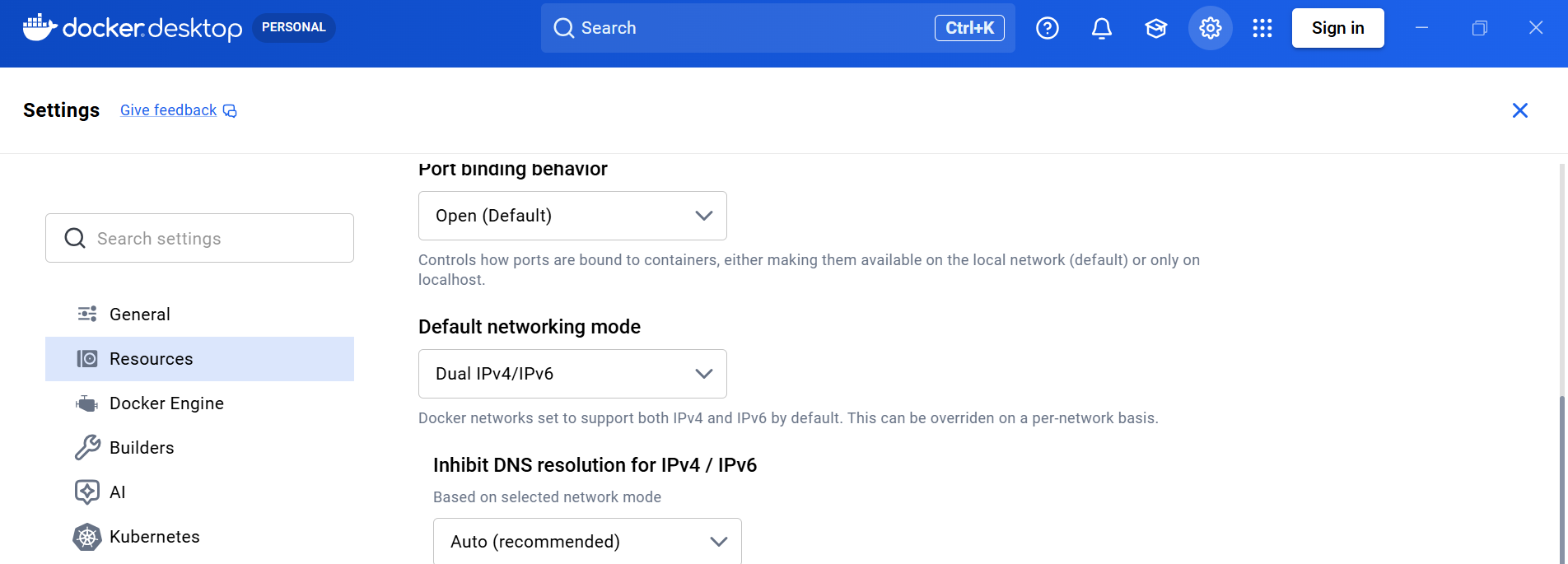
After applying this setting, re-run your tests.
Optional: Pre-pull the crossplane render image before running tests to avoid paying the image pull cost during the first test run:
docker pull xpkg.upbound.io/upbound/crossplane:<crossplane-version>Cause
up test run wraps each composition test's render in a single deadline taken from spec.timeoutSeconds in the test manifest. That budget must cover pulling the crossplane image, starting every function container, and running the pipeline. On Docker Desktop + WSL2, all of these steps are noticeably slower than on native Linux, causing the deadline to fire while waiting for the render container to exit.
The secondary network error (network is unreachable on an IPv6 address) occurs because Docker Desktop's default networking mode does not handle IPv6 connectivity correctly in some WSL2 configurations. Switching to Dual IPv4/IPv6 mode resolves the connectivity issue between function containers.
Note that up composition render is unaffected because it uses its own separate --timeout flag and is not subject to the test manifest deadline.